Desktop invoicing app for macOS
Stop paying monthly to send an invoice.
Open it, make an invoice, send it. No account to create, no cloud, no subscription. Free to download, and your data never leaves your Mac.
Signed and notarized for macOS, Apple Silicon and Intel. By downloading you agree to the Terms.
- currencies
- 48
- currencies
- PDF languages
- 7
- PDF languages
- free invoices a month
- 5
- free invoices a month
- once, yours for good
- $59
- once, yours for good
A desktop invoice generator that works offline.
InvoiceOffline is invoicing software for freelancers and small businesses. Invoices and quotes, deposits and partial payments, recurring billing, email and PDF export, income tracking.
It runs entirely on your Mac: no internet connection, no monthly subscription, no account.
Create an invoice in three steps.
Add a client
Save their details once. They'll autocomplete next time.
Create an invoice
Add line items, set your terms, see the PDF as you type.
Send it
Email it from your Mac with the PDF attached, or export the PDF. One click.
See it in action.
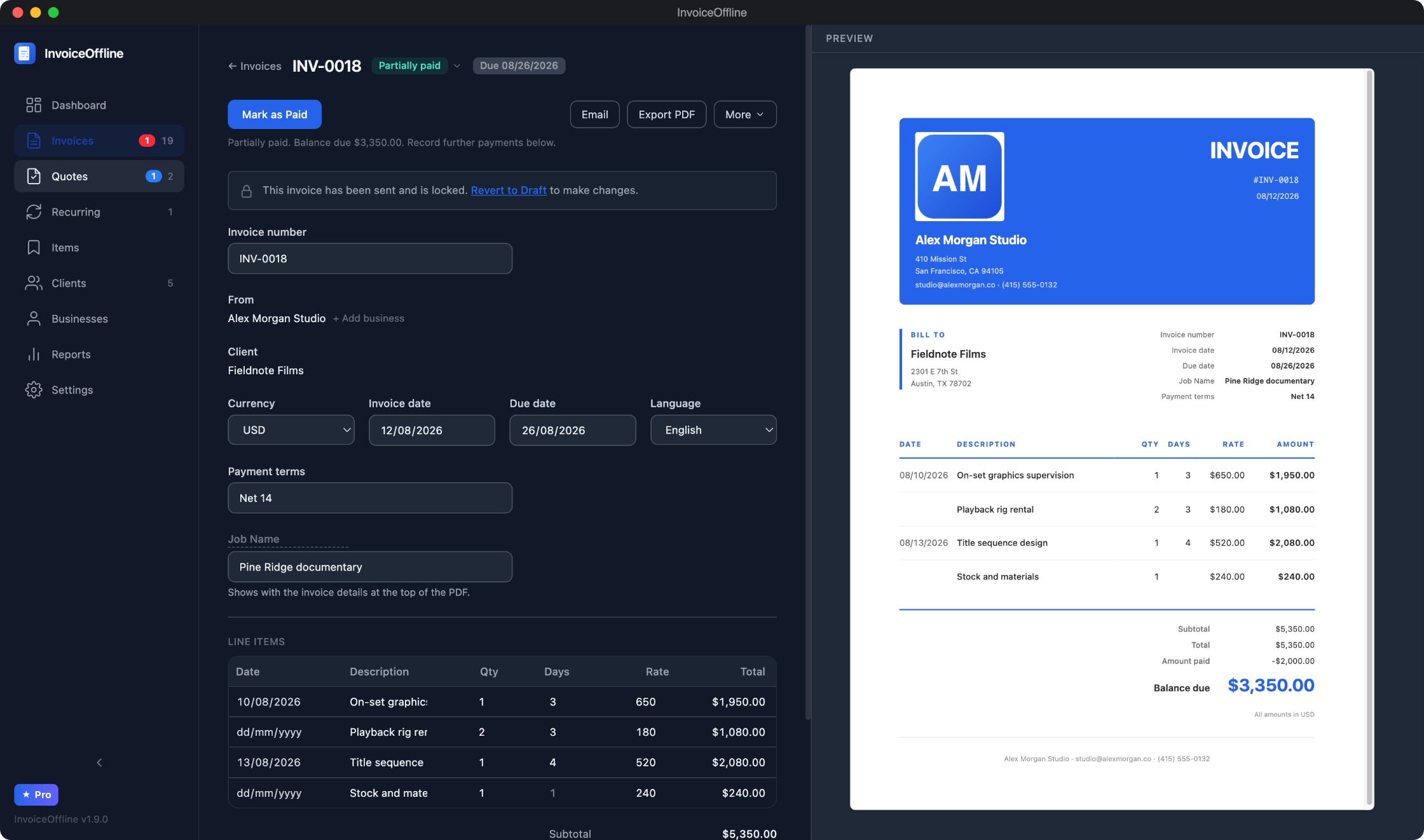
Fill in the details. The PDF writes itself.
A clean editor with a live PDF preview. Add line items in any of 48 currencies, group them into sections with their own subtotals, and shape the columns to the job: day rates, per-line dates, or just an amount. See the result as you type, then email it from your Mac or export the PDF.
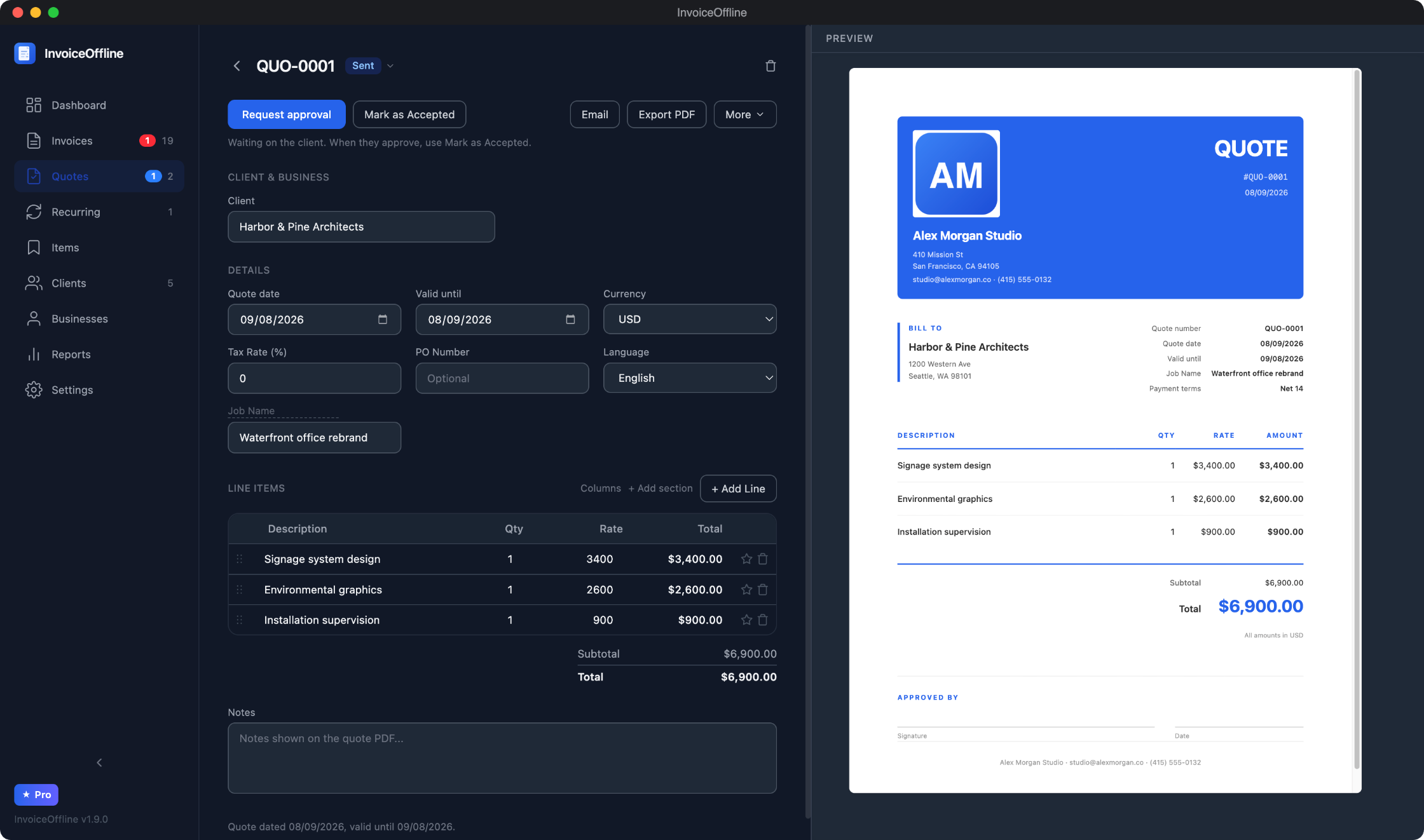
Quotes your clients can sign off.
Send a quote with a built-in approval section, then request sign-off by email. When the client says yes, convert it to an invoice in one click, or start with a deposit invoice and bill the balance when the work is done.
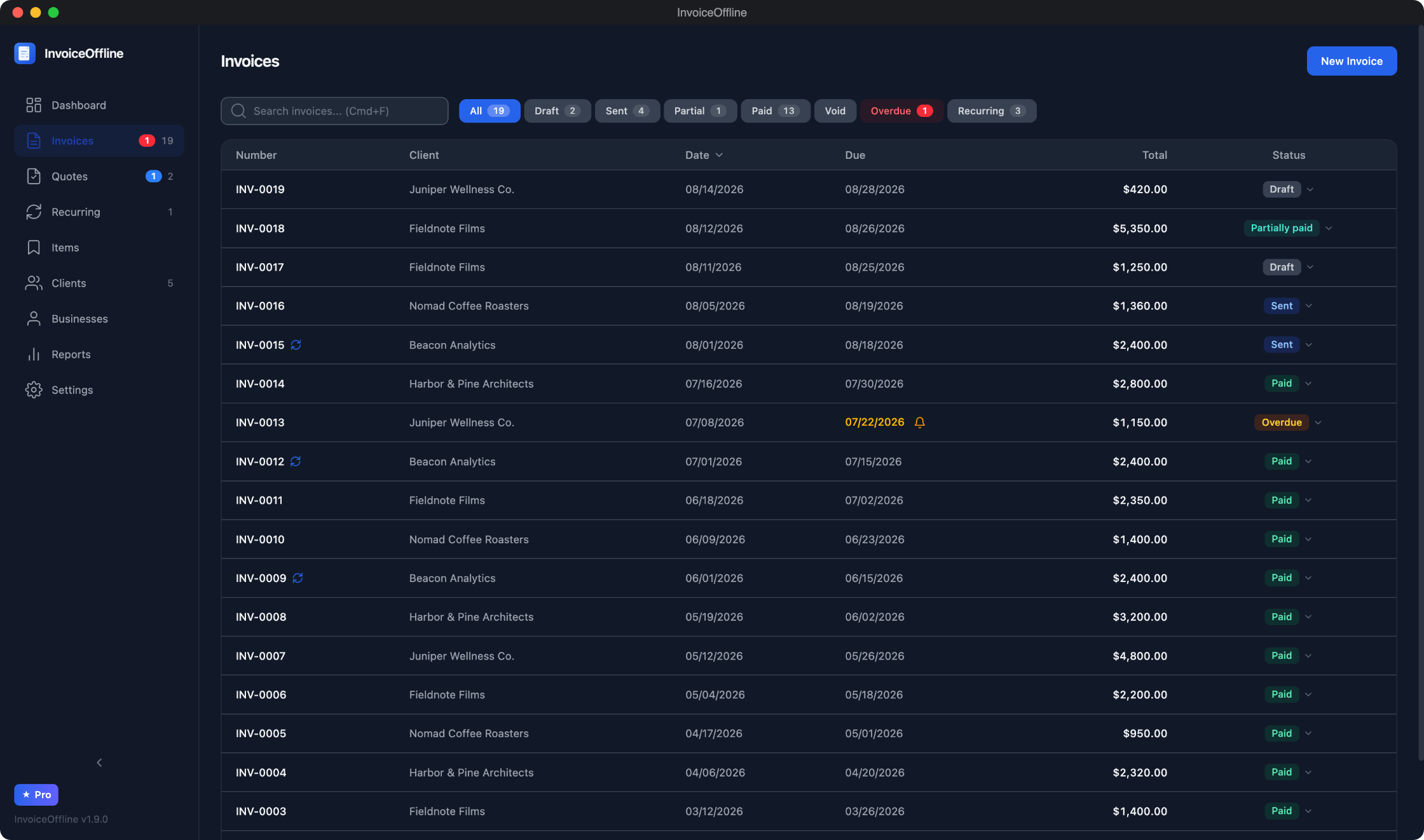
Every invoice, one glance.
Search, filter by status, sort by date or amount. See what's paid, partially paid, overdue, or still a draft, and record payments as they come in.
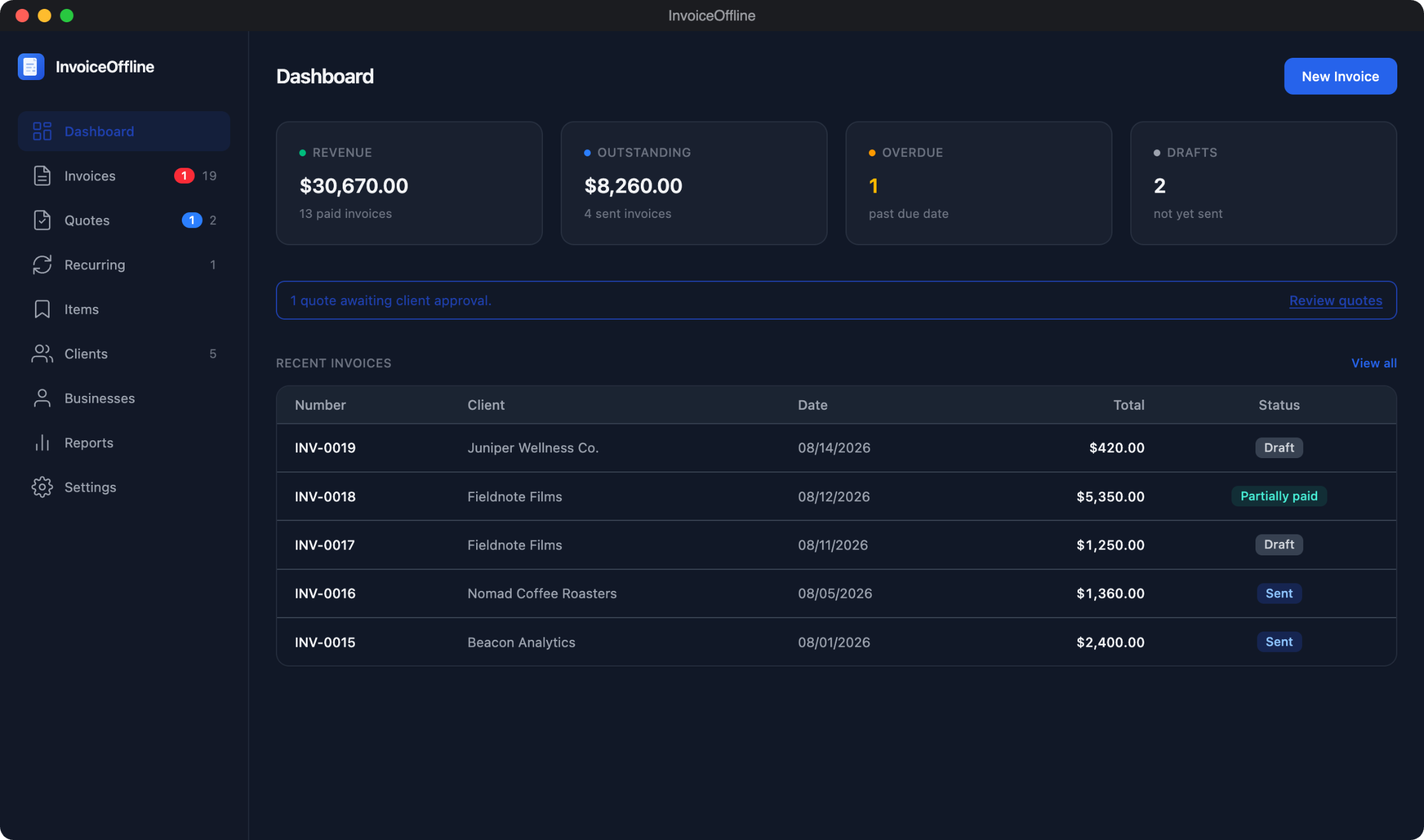
Know where your money is.
Revenue, outstanding, overdue, drafts, and the quotes still waiting on a client. Everything you need at a glance. Dig into reports when tax time comes.
Built to get you paid.
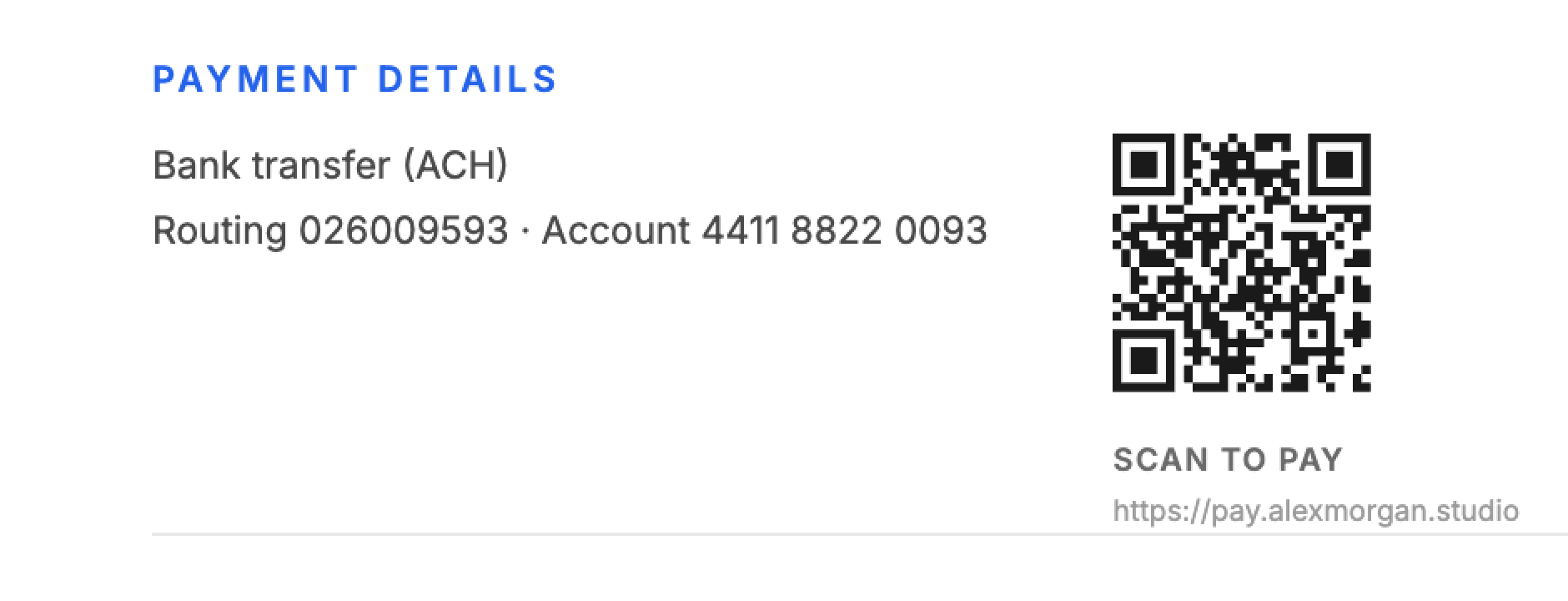
Paste your payment link once and every invoice PDF prints a scannable QR code next to your payment details, generated on your Mac. Record a partial payment and the PDF shows the balance due. If an invoice goes past due, one click opens a reminder email asking for exactly what's left.
Your brand on every PDF.
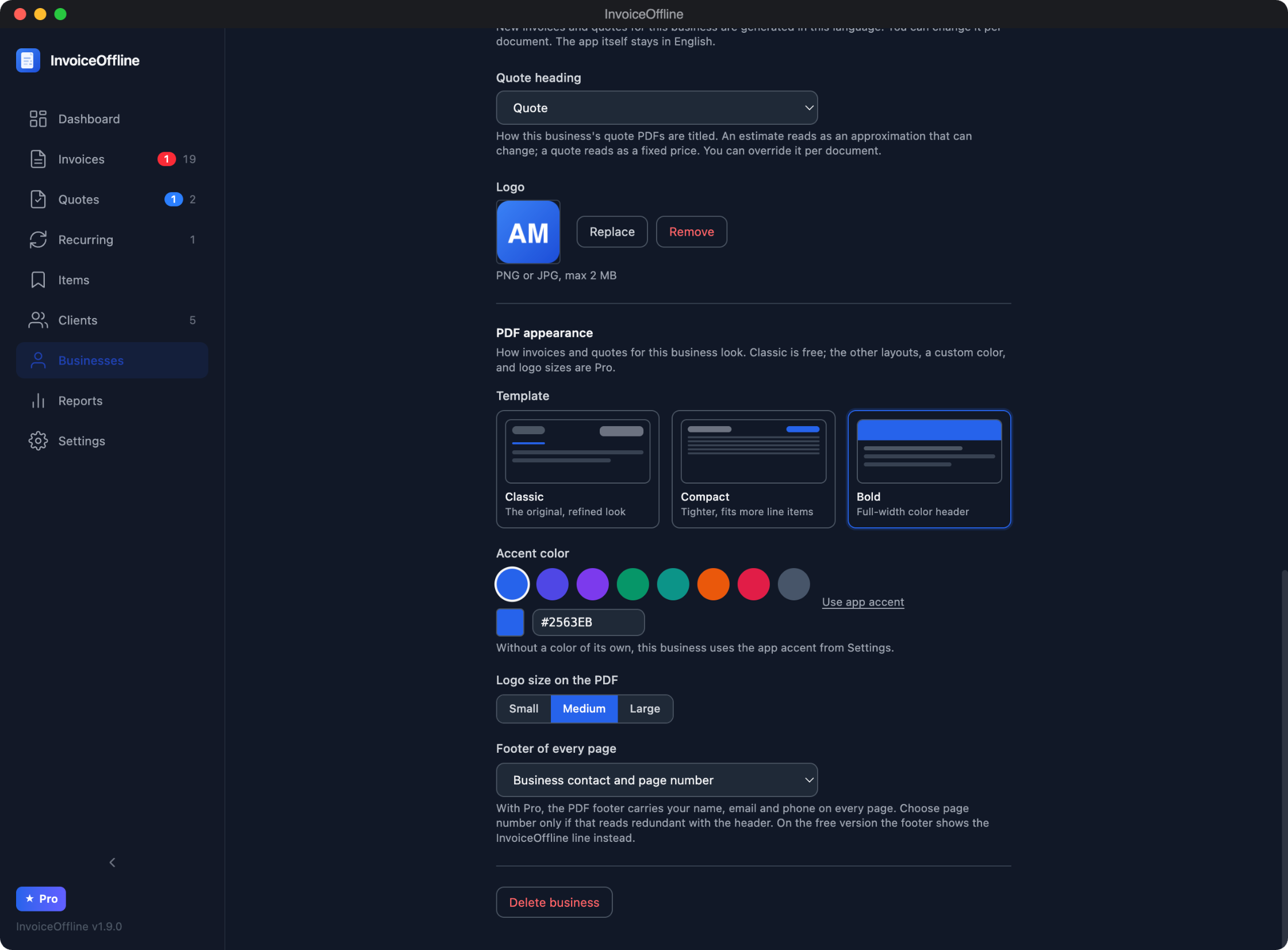
Three PDF layouts: Classic, Compact, and Bold. Give each business its own logo, accent color, and footer, and the live preview shows exactly what your client will get.
Now do it with your own invoice.
5 invoices a month on the free plan. No account, no card.
“It's exactly what I've been looking for.”
Requested by email. Shipped in days.
There's no feature committee here. You email support, a developer reads it, and the good ideas ship in the next update. Fifteen feature releases between July 19 and September 18, every one carrying something a customer asked for:
Newest, version 1.15.0
A customer kept pressing the wrong icons. So they got redrawn.
A customer wrote in about something most people just put up with: pressing the wrong thing in the sidebar, because at a glance the icons were hard to tell apart. Version 1.15.0 redraws them, a receipt for invoices, a document with a pencil for quotes, a box for items and a shopfront for businesses, and adds a label under every icon when the sidebar is collapsed, so finding a page stops being a memory test. The same release adds automatic backups: point InvoiceOffline at a folder or an external drive and it keeps a verified copy on a schedule, with the last ones kept for you.
“I press the wrong icons because I can't always tell at a glance what they represent.”Read the 1.15.0 release notes →
Version 1.14.2 · September 4, 2026
His estimates kept talking on his invoices. Now they stop at the door.
The film production owner who asked for editable headings wrote again: every estimate he converted still told his client it was valid for thirty days, and he deleted the line by hand each time. Version 1.14.2 gives the invoice its own notes and payment terms on conversion, and keeps anything he typed for that job.
Read the 1.14.2 release notes →Version 1.14.1 · September 2, 2026
The same Quebec freelancer wrote back. Two more fixes shipped.
Days after his second tax line shipped, the freelancer in Quebec wrote back with two things his tax office still needed: the French bill-to label read "Facturer à" when the correct wording is "Facturé à", and his GST and QST registration numbers had nowhere to go but one free-text field under his address. Version 1.14.1 fixes the wording and gives each tax its own registration number, printed at the end of that tax's own row.
Read the 1.14.1 release notes →Version 1.14.0 · August 30, 2026
In Quebec, one tax line is not enough. Now there are two.
A freelancer in Quebec asked whether he could set up two taxes: invoices there have to show GST and QST on separate lines, each with its own name and its own rate, and Revenu Quebec will not accept the two added into one. Until then InvoiceOffline had a single tax line, so his answer was a spreadsheet. He asked on August 29. Version 1.14.0 gives every invoice and quote a second tax line, set once per business and overridable per client, which also covers GST and PST across western Canada and CGST and SGST in India.
Read the 1.14.0 release notes →Version 1.13.1 · August 29, 2026
He bought it, then found his currency missing. It shipped that day.
A business owner in Dubai bought InvoiceOffline and hit a wall on the first day: the currency list had thirty one entries and the UAE dirham was not one of them. He invoices in AED alongside euros and dollars, so as it stood the app could not do his job. He wrote in on August 29. Instead of adding the one code he asked for, the list grew by seventeen, covering the Gulf, non-euro Europe, South and Southeast Asia, Africa and Latin America, for 48 in total. It shipped the same day.
Version 1.13.0 · August 25, 2026
He kept a Pentium running for twenty years. His two requests shipped the same day.
A heating installer in the Netherlands had kept a twenty-year-old Pentium alive because it ran his invoicing program and he did not want a subscription. He found InvoiceOffline by asking an AI assistant for software he could buy once, then wrote in with the two things his Dutch invoices still needed: the tax line has to read BTW, what the Belastingdienst expects, and each client's customer number has to print under the due date. He emailed on August 25 and both shipped that evening.
Version 1.12.0 · August 22, 2026
Shipping outpaced discovering.
The last few releases shipped features faster than anyone could discover them. The emails made it obvious: people kept asking for things InvoiceOffline already did. That IS feedback. 1.12.0 ships the answer: press Cmd+K and type what you want ("remove the footer", "payment QR"), or click any part of the invoice preview and land on the setting that controls it.
Version 1.11.0 · August 19, 2026
He bought it at night. His requests shipped the next day.
A new customer bought InvoiceOffline on the night of August 18 and sent his first requests while getting acquainted with it: tax-exempt line items for reimbursements, less currency-code repetition on his CAD invoices, and a contact person on clients. All three shipped as version 1.11.0 the next day.
Version 1.10.0 · August 17, 2026
He asked to number invoices his way. It took two days.
The AI-integration customer came back wanting invoice numbers in his own format — 2026-23, 2026-24, restarting every January — and his AI assistant able to set the number when it drafts. He asked on August 15; 1.10.0 shipped on the 17th.
Version 1.9.0 · August 12, 2026
Two customers asked. Both had it the same day.
A production sound mixer got a renameable multiplier column (Days, Nights) with a date on every line; a real estate photographer got address-and-amount lines and a payment QR code on his PDFs. Both requested, built, and answered by email the same day.
Version 1.8.0 · August 10, 2026
Custom document titles
A film production owner wanted his estimates to say "Shoot dates" instead of "Estimate date". He asked on August 2 and had it on the 10th, along with a per-business PDF footer setting.
Version 1.7.0 · July 30, 2026
Invoice drafting from your AI assistant (MCP)
A customer described how he already works: an AI assistant gathers job details from his email and texts, and he wanted it to write the invoice too. Five days later InvoiceOffline could be driven by Claude or Codex through MCP, entirely on his Mac.
How the AI integration works →Version 1.6.0 · July 27, 2026
Estimates and reusable saved items
The same film production owner kept emailing: estimates alongside quotes, and saved items so his day rates are one click away. Shipped three days after sections.
Version 1.5.0 · July 24, 2026
Line item sections
Sections with per-section subtotals, so Equipment and Labor can live on one invoice, and long multi-page PDFs that hold up.
Version 1.4.0 · July 19, 2026
Quote approvals, deposits, and reminders
A founding customer emailed a list: quote sign-off, deposit and balance invoices, payment reminders, more templates. One release shipped all of it.
Every update is free during version 1, for everyone. See the full changelog →
No cloud. No subscription. No telemetry.
Offline-first
Your data lives on your computer. No account, no server, no internet required. It works on a plane.
Free to use
The app is free forever, with 5 invoices a month included. Pro is a single payment that makes them unlimited and unlocks everything else. No subscription, no monthly fee, no renewals.
Private by design
The app has no telemetry and no cloud sync. Your invoices never leave your Mac. We never see your data because we never have access to it.
The whole app is free. Pro removes the limits.
Side by side, so there are no surprises.
Free to use. Pro when you need it.
Use InvoiceOffline free, forever: every feature, 5 invoices a month. One license makes it unlimited. No monthly fee, the way buying software used to work.
One-time · founder's price · first 100 licenses
When the first 100 licenses are gone, the price goes up. Founders keep every 1.x update and the V2 discount.
The one-time license unlocks
- Unlimited invoices (free includes 5 per month)
- Removes the InvoiceOffline footer from exported PDFs
- Recurring invoices for retainer clients
- Multiple businesses, each with its own branding & numbering
- PDF templates (Compact & Bold), custom colors, and logo sizes
- Every Pro feature we add during version 1, included
Secure checkout by Lemon Squeezy. Your license key arrives by email moments after you pay. 14-day refund policy.
“You have saved me time and money and for that I appreciate what you have made.”
What you own when you buy
- A perpetual license. It never expires. Activation happens on your Mac, and works offline.
- Every version 1 update. Features, improvements, and fixes in the 1.x line are included. You pay once and never again until a future major version.
- All of your Macs. No activation limit and no hardware lock. One license, every machine you own.
- Your data, in a file you control. Everything lives in a local database on your Mac, with one-click backup to a single file.
- An app that outlives us. There is no server to shut down. If the company disappeared tomorrow, the app, your license, and your data would not notice.
- A 14-day refund policy. If it's not for you, write us and get your money back.
And if a major Version 2 ever arrives, it will be a separate purchase, and founder-price buyers get at least 50% off. The license terms in plain words.
Questions.
Is it free? What does the license add?
InvoiceOffline is free to download and use, with no time limit: every feature is included, and you can create 5 new invoices each calendar month. Exported PDFs carry a small InvoiceOffline footer. A one-time license makes invoices unlimited, removes the footer, and unlocks the Pro features: recurring invoices, multiple businesses, and extra PDF templates with per-business colors, plus any Pro feature we add during version 1.
Why isn't it just free?
Because free software is the kind that disappears. The one-time license is what pays for InvoiceOffline to still be here in two years, when macOS changes something and a bug needs fixing, and it's why there are no ads, no upsells, and nothing clever done with your data. The other half of the answer is that you aren't trusting us with much: the app runs entirely on your Mac, so if we stopped tomorrow, your copy, your license, and your invoices would keep working exactly as they do today. And the free plan isn't a countdown: 5 invoices a month, every feature, for as long as you want.
How long does the founder price last?
The founder's price is for the first 100 licenses, counting the ones already sold. When they're gone, the price goes up. What it will never do is go below the founder's price: that's the promise to the people who bought first. And whenever you buy, the license is perpetual, every version 1 update is included, and if a major Version 2 ever arrives, founder buyers get at least 50% off.
How does the 5 invoices per month limit work?
Each calendar month you can create 5 new invoices for free, and the counter resets on the 1st. Everything you already created stays fully editable, exportable, and sendable at any time, and clients and quotes are unlimited. The one-time license removes the monthly limit.
Do I get updates?
Yes, all of them. Every version 1 update is free for everyone, paid or not. And if you own the license, any new Pro features we ship during version 1 are included too, at no extra cost. You pay once and never again until a future major version.
Can I email invoices?
Yes. One click opens a draft in your Mac's Mail app with the PDF already attached, ready for you to review and send from your own account. Nothing is sent through our servers.
Can I use it with Claude, Codex or another AI assistant?
Yes, and nothing leaves your Mac. InvoiceOffline speaks MCP, so an assistant on the same computer can look up what you charged a client last time, draft the invoice from your own saved rates, correct it, export the PDF for you to attach, and record what was sent or paid. It never sends email and never deletes anything, so you stay the one who reviews and sends. No network port is opened and nothing is uploaded, because the assistant is already on your machine. It works on the free plan too, with drafts counting towards your 5 invoices a month.
How the AI integration works →Can I send quotes or estimates?
Yes. Create and send a quote, and request approval by email: quote PDFs include a printable sign-off section your client can sign. When they accept, convert the quote to an invoice in one click, or bill part of it upfront with a deposit invoice and invoice the balance when the work is done. Quotes are free, no license needed.
Can I track partial payments?
Yes. Record what a client has paid on any sent invoice and the balance due shows in the app and on the PDF. If an invoice goes past due, one click opens a reminder email with the PDF attached, asking for the remaining balance rather than the full amount.
Can I change how my invoices look?
Every invoice and quote uses a clean, professional layout with your logo, and a live preview shows exactly what your client will get. The one-time license adds two more layouts (Compact and Bold), a custom accent color, and logo sizes, configurable per business.
Do I need to create an account?
No. InvoiceOffline runs locally on your Mac. There is no account, no login, and no server.
Does InvoiceOffline work offline?
Yes. It's a desktop app. Everything works without an internet connection: creating invoices, exporting PDFs, managing clients.
Can I export invoices as PDF?
Yes. Every invoice exports to PDF with one click, with a live preview as you edit. Free exports include a small InvoiceOffline footer, which the license removes.
Does InvoiceOffline store data in the cloud?
No. All data is stored locally on your computer. Nothing is uploaded, synced, or transmitted anywhere.
Is InvoiceOffline a subscription?
No. It's a one-time purchase, not a subscription: no monthly fees, no annual renewals. The app is free to use; you pay once, only if you want unlimited invoices, no InvoiceOffline footer, and the Pro features.
Can I use my license on more than one Mac?
Yes. There's no activation limit; use the same key on all of your Macs.
What if I lose my data?
InvoiceOffline can back up your entire database to a single .invoiceoffline file. Restore it anytime with one click.
What platforms does InvoiceOffline support?
macOS. Windows and Linux versions depend on demand: open this page from a Windows or Linux machine and the download button becomes a waitlist. Enough emails there is what gets a port built.
Still have a question? Email us at support@invoiceoffline.com.
Send your next invoice from an app you own.
Download it now, add a client, and have a professional PDF out the door before your subscription tool finishes logging you in.
Free includes 5 invoices a month. No account, no card, no trial clock.