Guide
Send the invoice in your client's language, not yours
Cross-border freelancing is normal now: a developer in Porto bills a startup in Munich, a designer in Buenos Aires bills a studio in Paris. The work crosses borders effortlessly. The invoice usually doesn't; it shows up in English with labels the client's bookkeeper has to interpret.
It matters more than it seems. The person who pays your invoice is often not the person who hired you. An accounts-payable clerk in Munich processes a stack of German invoices; the one with "Due date" and "Amount due" in a foreign language is the one set aside for later. Sending the document in the reader's language is the cheapest way to be the invoice that gets paid first.
What "invoice language" should mean
Done right, it's a property of the document, not of your app:
- Per invoice, not global. Your German client gets German, your US client gets English, on the same day, from the same app.
- The client-facing labels translate. Invoice, date, due date, quantity, rate, totals, payment details: every label the client reads. Your line-item descriptions stay whatever you write (write those in the client's language too if you can).
- Your app stays in your language. You shouldn't have to operate a Dutch interface to send a Dutch invoice.
- Currency formats follow the currency. A German invoice in euros should read 1.500,00 €, a US one $1,500.00, a Japanese one ¥150,000 with no decimals. Language and currency are separate choices that both have conventions.
One honest boundary: language is presentation. What your invoice must legally contain (tax IDs, VAT lines, required statements) depends on where you and your client operate, and that's between you and your accountant. No language dropdown handles compliance, ours included.
How it works in InvoiceOffline
InvoiceOffline (a Mac invoicing app that runs fully offline) treats language exactly as above, since version 1.3.0:
- On any invoice or quote, pick the document language: English, German, Spanish, French, Italian, Portuguese, or Dutch.
- The live PDF preview switches every client-facing label instantly. Same layout, same branding, same numbers, different reader.
- Pair it with any of 48 currencies, each formatted by its own convention (JPY and KRW without decimals, three-decimal currencies handled, symbol placement per currency).
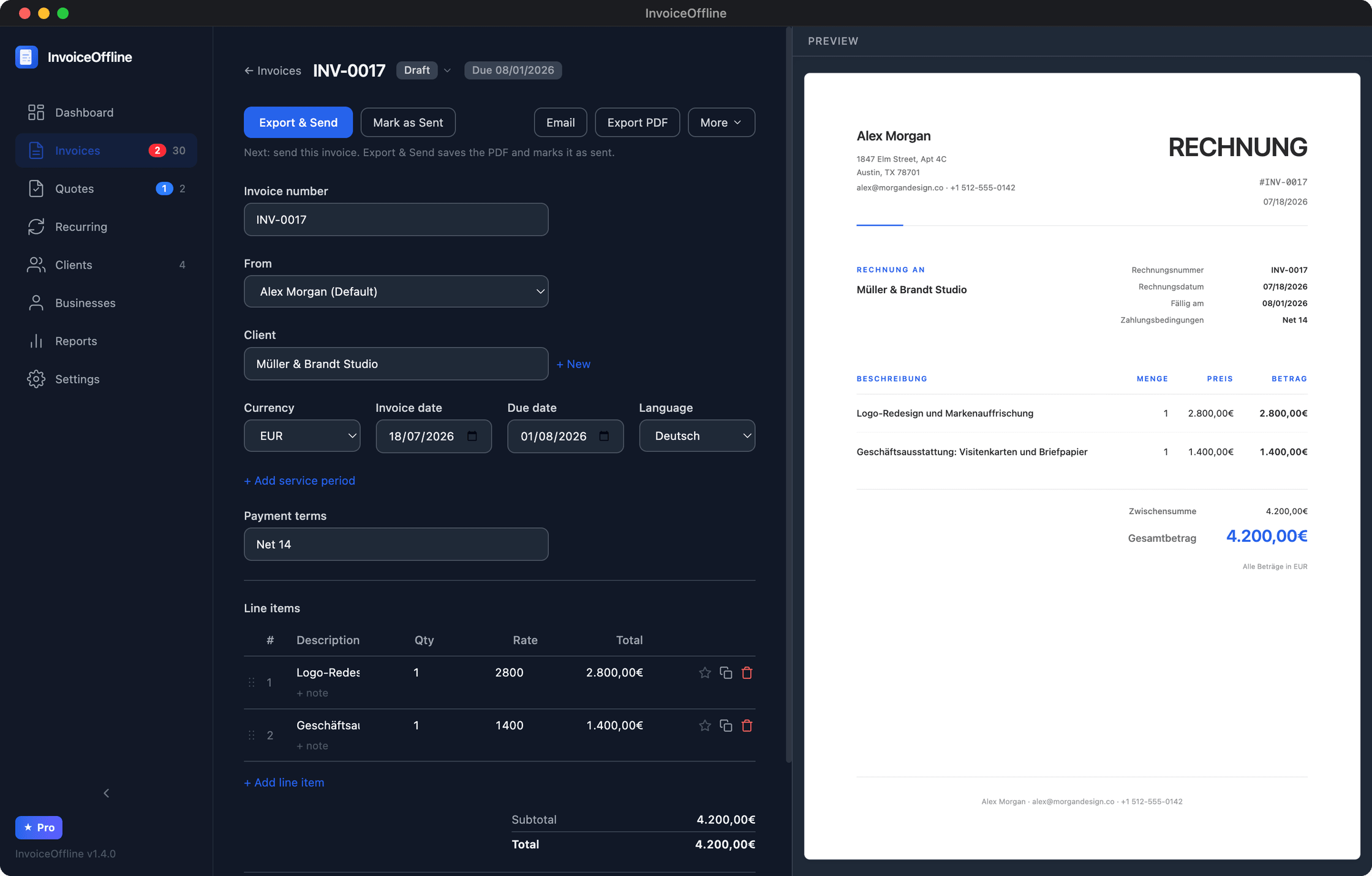
Each client can default to a language, so the Munich client's documents come out in German without your remembering anything.
A version-history footnote worth telling: per-document languages exist because a user emailed asking to invoice in German. It shipped as version 1.3.0 within days (changelog). That's the kind of software this is.
The rest of the app, briefly
Quotes with a printable client sign-off, deposit and balance invoices, partial payments, overdue reminders, per-business branding. Free to download and use with 5 new invoices a month, no account. A one-time $59 license (founder price, $79 regular) removes the limit; no subscription, updates through version 1 included. Why it works offline.
Your next international invoice, in their language
Download free, pick the client's language on the invoice, and watch the PDF switch. No account, no subscription.
Free includes 5 new invoices a month, every feature, no account.