For contractors and trades
Invoicing for contractors who bill by the job
Contractor invoicing has a shape that accounting software fights you on. No two jobs are the same, so the description has to explain the work, not label it. Labour and materials are different money to the person paying. There's usually a deposit before anything starts and a balance when it's done. And the whole thing happens maybe two to five times a month, which is a hard thing to justify a monthly subscription for.
InvoiceOffline is a Mac app for exactly that: professional invoices, a record of who paid, and nothing you have to feed every month. Here's a real one, end to end.
The worked example: a kitchen renovation
A kitchen job with demo, framing, cabinets, countertop, permits and two bins. Billed in Canadian dollars with GST and PST, because that invoice has to carry both:
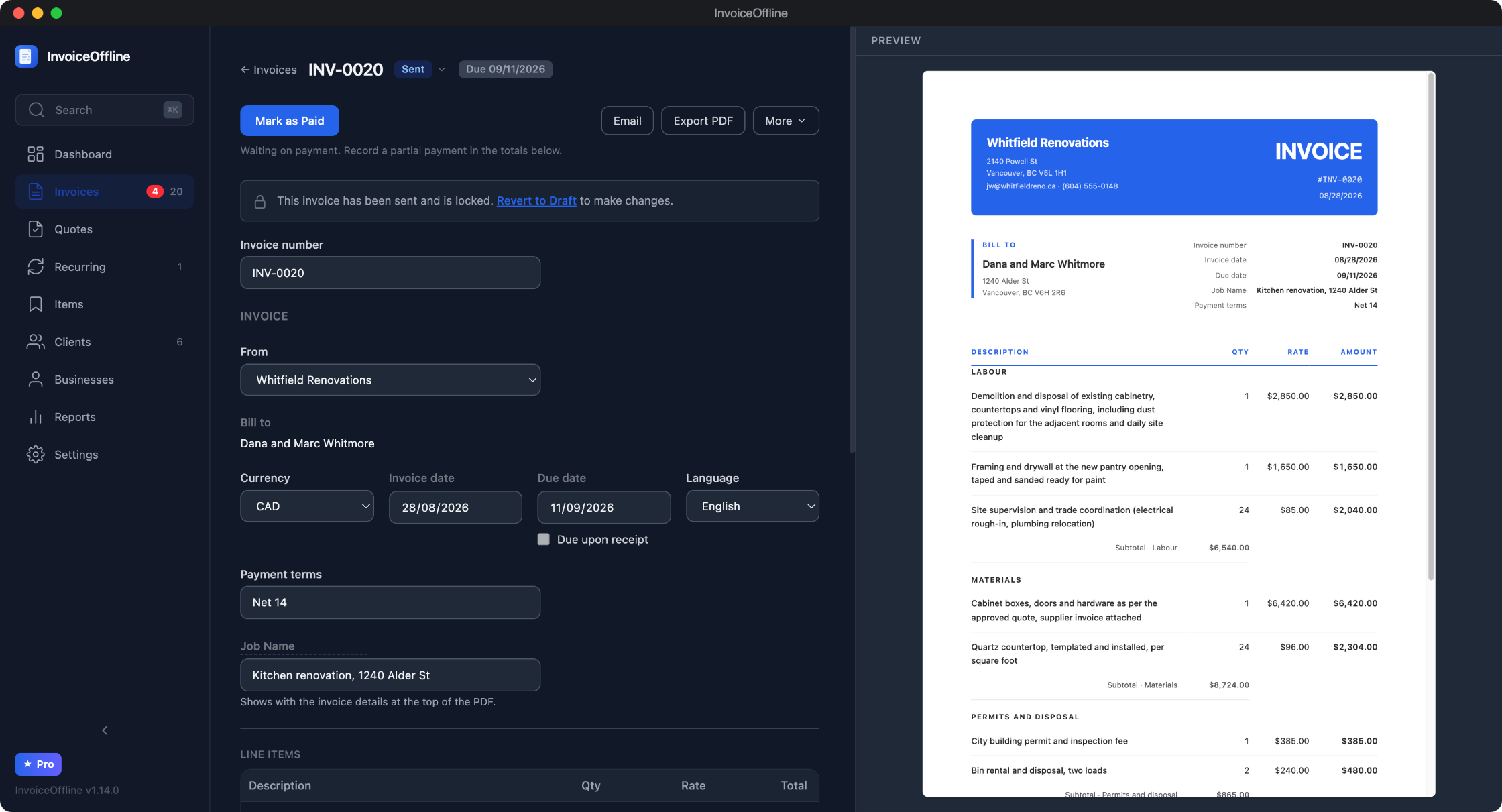
Descriptions have room. A line item's description is free-form and as long as the work needs. "Demolition and disposal of existing cabinetry, countertops and vinyl flooring, including dust protection for the adjacent rooms and daily site cleanup" is one line, and it prints in full on the PDF. This is the single most common reason people arrive here from accounting suites, where a line item is built around a ledger entry and the description behaves like a label.
Labour, materials and permits are sections. Group your lines under headings and each one prints its own subtotal, with the combined total at the bottom. The homeowner sees $6,540 of labour, $8,724 of materials and $865 of permits and disposal instead of one wall of numbers, which is usually the difference between a question and an approval.
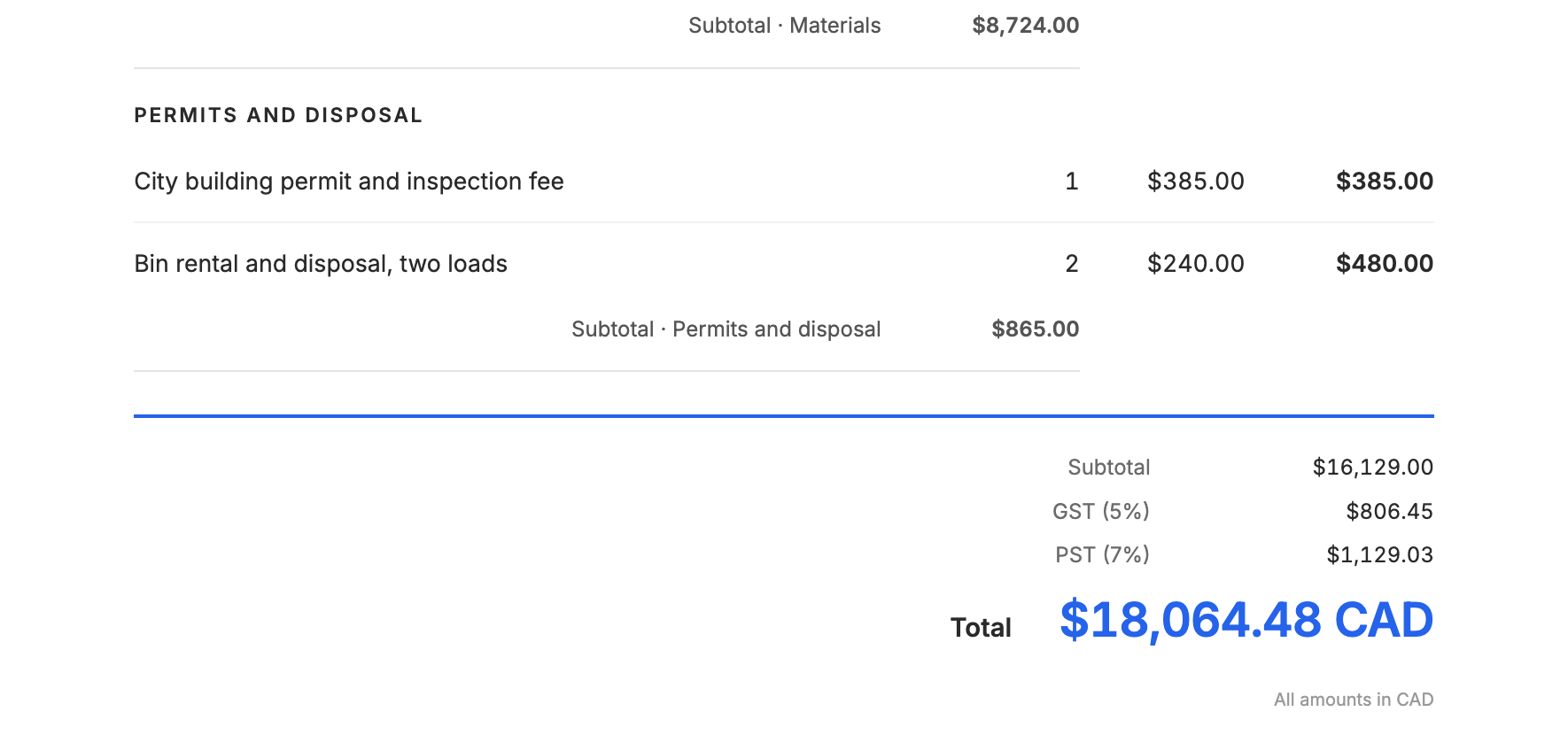
Two taxes, on separate lines. An invoice can carry two taxes with their own names and rates, set once for your business and adjustable per client: GST plus PST or QST in Canada, or any pair your work needs. Which taxes you charge is between you and your accountant; the app's job is to print them correctly and do the arithmetic every time.
The lines you repeat are saved. Star a line and it lands in your item list, so the next job starts from your own rates instead of a blank page. Bin rental, permit fees, your hourly supervision rate: pick them, adjust the numbers, done.
Deposit first, balance at the end
Renovation money almost never arrives in one payment, and that's where a spreadsheet starts to hurt. The app handles the sequence directly: send a quote the client can sign off on, convert it into a deposit invoice, and when the job is done, the balance invoice lists the work and subtracts the deposit already received, referencing the earlier invoice number so nobody has to reconstruct the math.
Partial payments work the same way: record what came in, and the invoice keeps showing what's still owed. How to invoice a deposit walks through the whole sequence. If a client goes quiet, the app knows which invoices are overdue and can draft the reminder for you.
Coming from QuickBooks, Sage, or a spreadsheet
The story we hear most often runs in that order. Accounting software first, because the accountant asked for it. Then the fee climbs a few dollars a year while the number of invoices stays at two to five a month, and at some point the arithmetic becomes hard to ignore: a $40-a-month plan against four invoices is $10 an invoice. Then a spreadsheet, which prints a fine invoice and quietly fails at the part that actually matters, which is remembering what's been sent, what's been paid, and what's late.
The honest half: this is not accounting software. No bank feeds, no expenses, no payroll, no tax filing. Plenty of people keep the bookkeeping exactly where it is and move only the invoicing out of the subscription. What your accountant gets at year end is a CSV export from Settings for whatever date range you pick: invoices, their line items, and clients. The full map of buy-once invoicing software covers the rest of the category, including the cases where a subscription genuinely wins.
That path is not hypothetical. A contractor who walked it, accounting software first and then a spreadsheet, wrote in a couple of hours after buying:
“It literally has everything I need. Multiple lines with any amount of text description.”
Why contractors specifically end up here
- It works on site. The app is fully offline. A basement with no signal, a new build with no service, a truck: you can write the invoice where the work happened and email it when you're back in coverage.
- Your volume fits the free tier. Five new invoices a month, free, with every feature included. A lot of small contractors never need more than that, and the ones who do already know the app works before they pay for it.
- You buy it like a tool, not like a service. The Pro license is $59 once (founder price, $79 regular): unlimited invoices, recurring billing for maintenance clients, multiple businesses. Perpetual for version 1, every 1.x update included, no activation limit across your Macs.
- Your records stay yours. Invoices live in a file on your Mac, backed up with one click, with no account and nothing on anyone's server. If this app's developer vanished tomorrow, the copy on your machine would keep working. Why it's built that way.
Rebuild your last invoice in it
Download it free, no account and no card, and put your last job through it. If it fits how you bill, the license is $59 once, with a 14-day refund policy.
Free includes 5 new invoices a month, every feature, no account.